
Hello,
I got another sale yesterday. A rope bracelet this time. Nothing flashy. Just simple.
But here’s what surprised me… The customer found my store through ChatGPT
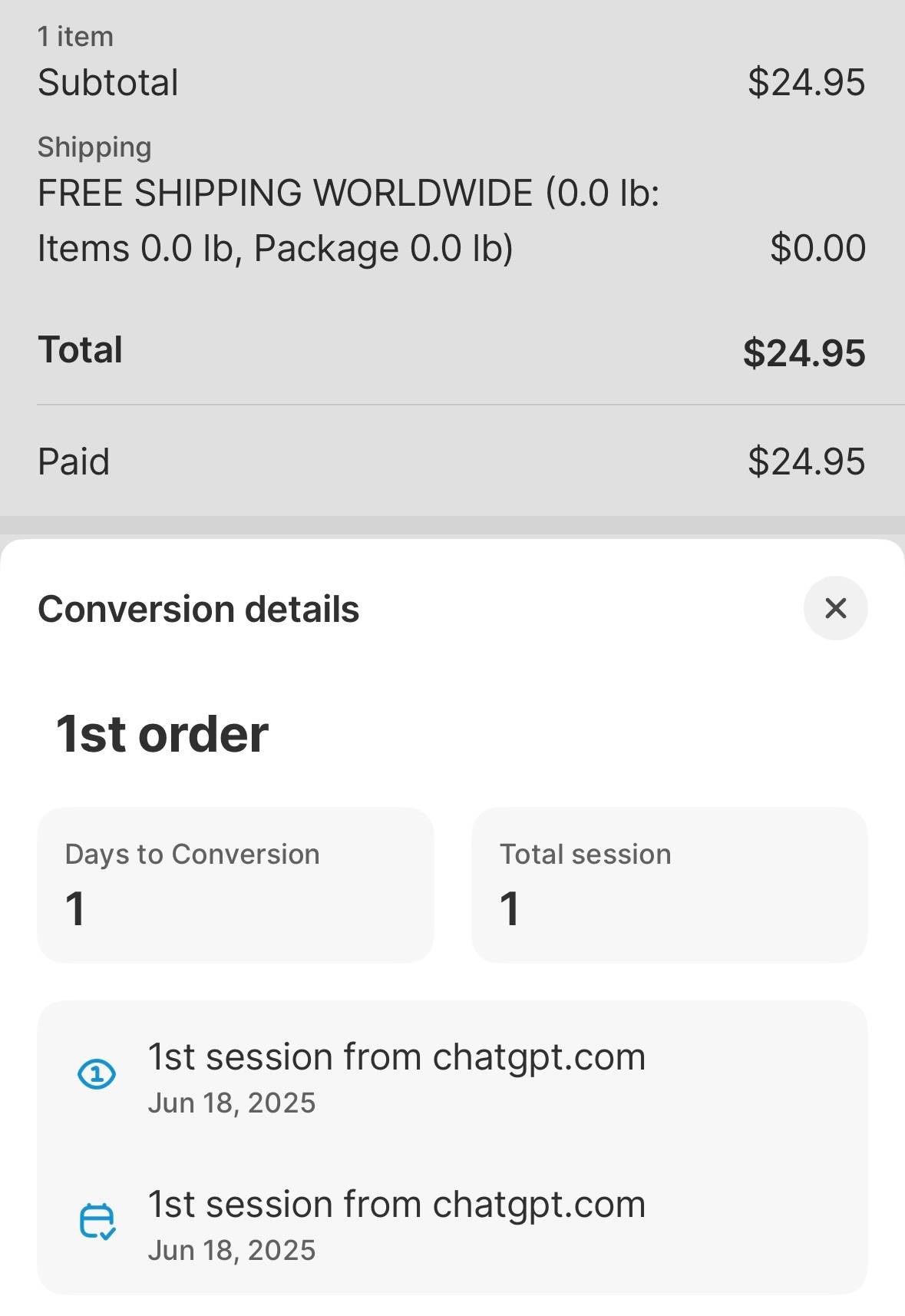
Again.
No ads. No Facebook posts. No influencer shout-out.
They just typed a question into ChatGPT… And boom — my store popped up.
This is happening more often. ChatGPT isn’t just answering questions now. It’s recommending stores.
So here’s the play: Whenever you need help with your store, don’t just Google it. Ask ChatGPT.
But here’s the twist: Tell ChatGPT about your store.
Give it your store name. Tell it what you sell. Drop your website link.
Because the more you talk to it, the more it remembers. And when someone else asks about gift ideas in your niche… Guess who it might suggest? 😉
That’s why, in the last episode, I showed you how to:
- Ask ChatGPT to find web directories
- Let it write your descriptions
- Submit your store info
You weren’t just building backlinks. You were training the AI to know your store.
Some folks asked, “Should I do this with Gemini or Claude too?” You can — but if you’re short on time, focus on ChatGPT.
Why? Because regular people — like your future customers — only know one name.
Ask your mom. Ask your uncle. Ask your neighbor. They all say: “ChatGPT.”
So, if you’re going to train an AI… Train the one your buyers already talk to.
Let’s Fuel Your Store a Little More 🔥
You’ve already done the heavy lifting:
✅ Shopify store? Set up.
✅ Smart collections? Working.
✅ Products? Uploading daily via PODtomatic.
✅ Web directory backlinks? In progress.
Now, let’s unlock another free traffic source:
Social Media.
More specifically: Your Facebook Page and Instagram Business Account.
Here’s why this matters:
Every time you post a product with a link… That’s another backlink to your store. That’s another way for new people to discover you.
If someone scrolls Instagram and sees a post with #NurseGifts and clicks your link?
Boom. You just got traffic.
If someone shares your Facebook post about a funny engineer mug with their friend?
Boom. More eyeballs.
Small wins. But they stack.
How to Set Up Your Social Media
Here’s what to do:
1. Set Up Your Facebook Page and Instagram Business Account.
Use your store name. Add a logo.
Most important — paste your website link into the bio and About section.
Now you’ve got two public backlinks. Done ✅
2. Start Posting.
3–4 times a day is plenty.
Each post should have:
- A product image
- A short, fun caption
- A product link
- A few niche hashtags like #EngineerGifts or #GiftsForTeachers
That’s it. You’re not trying to go viral. You’re just showing up, posting consistently.
Because when you post consistently, Facebook and Instagram reward you. They show your posts to more people.
And some of those people…will click. Some will share. Some will buy.
The Manual Way vs. The Automated Way
Now, real talk:
I used to do this manually. Even with a scheduler, it was a pain.
Save product images. Ask AI to write captions. Copy/paste into a tool.
It felt dumb. All the product info was already on my Shopify store. Why couldn’t the tool just pull it for me?
So I built one.
It’s called lzyPost.
Here’s how it works: I paste a bunch of Shopify product URLs into it.
Then… it does the rest.
✅ Grabs the images
✅ Writes the caption
✅ Adds hashtags
✅ Prepares the post
I review, tweak a little, click “approve” — done. I can schedule a full month of posts in under 15 minutes.
And it’s working.
Posts go out. People click. Sales happen.
I’m not alone either — over 10,000 posts have been made using lzyPost so far.
If you want to try it, head over to lzypost.com.
There’s a 7-day free trial. And during this pre-launch, I’m offering 50% off the yearly plan.
If you’ve got a Facebook Page and Instagram… Don’t let them sit there collecting dust. Start posting. Let them bring in free traffic.
Two Ways to Grow
Now you’ve got two smart ways to grow:
- Web directories for search engine rankings
- Social media for daily backlinks and traffic
One is manual. One is automated.
Both help your store grow — one post, one backlink, one visitor at a time.
More strategies coming in the next episode.
For now — you know what to do.
Talk soon,
Bank K.
P.S.
We’ve come this far together — now I want to hear from you.
Hit reply and tell me where you’re at.
Something like:
“I’m building my store!” “I’m submitting my site to web directories!” “I’m about to start posting to social media!”
Whatever it is — I’m cheering for you. Every reply helps fuel the next episode. We’re doing this together.
P.P.S.
Don’t forget: slow growth is still growth. One backlink. One post. One visitor. One order. That’s how you build your POD Traffic Engine.
Keep going.
