Hello,
You’ve come a long way.
Many of you now have your stores fully set up. The smart collections are built. Products are getting added automatically every day.
Your Shopify store is live.
And your traffic engine is quietly running in the background.
But now… it’s time to help your store grow even faster.
Because we’re not just building stores. We’re building traffic engines.
The kind that keep working month after month — without buying ads.
When we created your smart collections, we started something called pSEO — programmatic SEO.
Every smart collection you made is actually a keyword page. Pages like:
- “Gifts for Engineers”
- “Ornaments for Teachers”
- “White Coffee Mugs for Siamese Cat Lovers”
Google loves pages like these.
And every time PODtomatic uploads new products, your store grows.
More products → more pages → more content → more for Google to find.
The beauty of pSEO is simple:
Once it’s set up, it keeps growing by itself.
But like planting a seed, it takes time to grow into a tree.
Quick Tip: Make Your Product Pages Look Better
Before we dive into traffic, let me share a quick tip that many of you asked about.
After checking several stores that you guys shared with me, I noticed one small thing that can make your store look better.
Inside the Spotlight theme, the product title on your product pages is way too big.
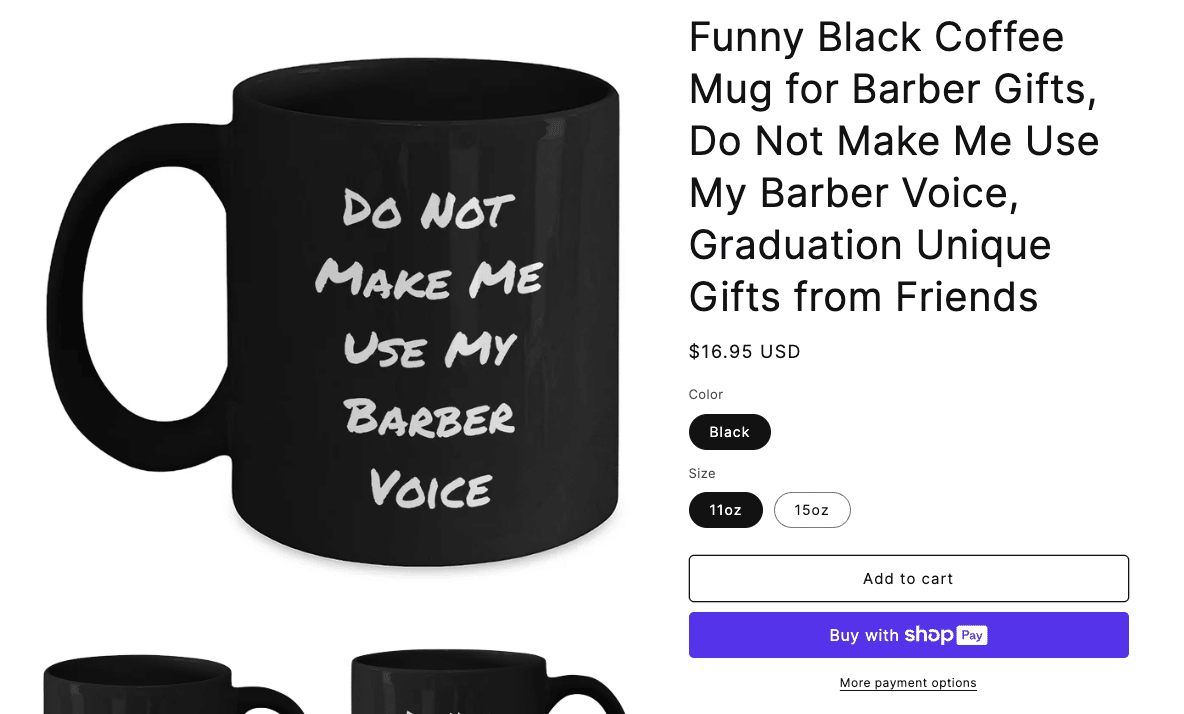
Title takes up almost half the page. It makes the page feel heavy and hard to read.
The fix is super simple.
Go into your Shopify admin.
Click Theme > Theme Settings > Custom CSS.
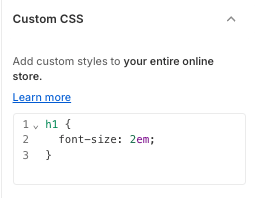
Inside the box, paste this:
h1 {
  font-size: 2em;
}
Done.
Now your product titles will shrink down a bit and your store will look much cleaner.
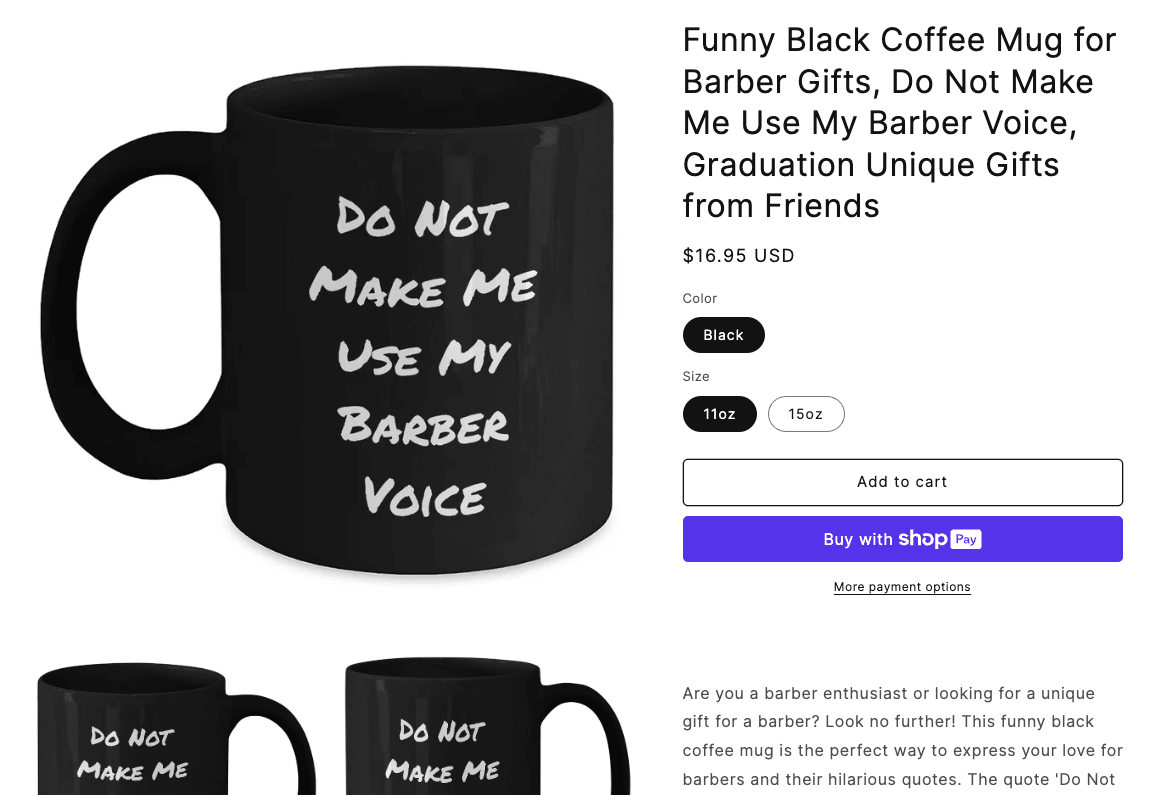
Of course, feel free to adjust your store’s style even more. But this tiny change already helps a lot.
Now Let’s Get Into Traffic.
You’ve already done the hard part.
Your store is live. Products are coming in daily. Your smart collections are working behind the scenes.
And Google is slowly discovering your pages.
If you check Google Search Console, you’ll see your indexed pages growing over time.
That means Google is starting to find your site.
But this doesn’t happen overnight. Google takes its time.
So, how do we help Google move faster?
The answer: backlinks.
What Are Backlinks?
If you’ve never heard that word before, don’t worry.
A backlink is simply a link from someone else’s website that points to your store.
When Google sees that other websites are linking to your store, it thinks:
“Hmm…other sites are pointing to this one. Maybe it’s worth paying more attention to.”
The more good backlinks you have, the better your store has a chance to rank.
You can think of backlinks like little bridges that bring Google bots over to your store.
Every new bridge helps Google find more pages and rank you higher for more keywords.
Where Do I Get Backlinks?
Now I know what you might be thinking:
“Where do I even get backlinks?”
We’re going to start simple.
You don’t need to email bloggers. You don’t need to pay for expensive backlinks.
At least not yet.
The easiest way to start is by submitting your store to web directories.
What’s a Web Directory?
It’s just a list of websites. Kind of like the old yellow pages, but online.
Many web directories let you submit your website for free.
Once your store is listed, Google can find your link there.
It’s not the strongest backlink in the world, but it helps Google start noticing your store.
And that’s exactly what we want right now.
How to Find Web Directories
Here’s how you can find these directories easily:
Open ChatGPT.
Type something like:
“Give me a list of 50 free web directories where I can submit my Shopify store. My store URL is [your store URL]. I’m selling gifts for people on various occasions.”
(Insert your store URL so ChatGPT learns about your store as well.)
ChatGPT will give you a big list.
You don’t need to submit to all 50 in one day. Just pick 5 to 10 directories each day.
Submit your store, write a short description, and move to the next one.
This is how you trade your time for traffic. No ads. No spending. Just your effort.
Every directory gives you one more backlink. And every backlink helps Google trust your store a little more.
Be Patient
Now — be patient.
Backlinks don’t work overnight. But if you do this daily, your backlinks will keep stacking up.
And over the next few months, you’ll see:
- More pages indexed
- More keywords ranking
- More visitors coming in
This is how you build real traffic that keeps growing for years to come.
Coming Up Next
In the next episode, we’ll go one step further. Because web directories are just the beginning.
I’ll show you another backlink method — and this one can be automated too.
Talk soon,
Bank K.
P.S. If you’ve started submitting your store to web directories, hit reply and say:
“I’m building backlinks!”
Your replies help fuel me to write faster and share more. We’re in this together.
P.P.S. If you haven’t got PODtomatic to upload products to your store daily yet, you can still grab the Shopify Plan here:
